How to Choose the Right Baby Monitor for Your Family
Posted on
**Collaborative post**
Bringing a new baby home is one of life’s most rewarding experiences, but it also comes with a constant undercurrent of worry — especially during those quiet hours when your little one is sleeping in another room. A baby monitor bridges that gap between your peace of mind and your baby’s safety, letting you check in without hovering over the crib every few minutes. But with so many options available today, choosing the right one can feel overwhelming. From basic audio units to feature-rich video monitors with pan-tilt cameras and app connectivity, the range is vast. What works perfectly for one family may be the wrong fit for another. Your home layout, your baby’s sleep habits, your own comfort with technology, and your budget all play a role in the decision. This guide walks through everything you need to know — the key features to look for, the differences between monitor types, common pitfalls to avoid, and practical advice for getting the most out of whichever monitor you choose. By the end, you’ll have a clear picture of exactly what your family needs.
Baby monitors have evolved dramatically over the past decade. The earliest models were simple one-way audio devices that transmitted sound from the nursery to a handheld receiver. They did the job, but parents were left guessing about what was actually happening. Today’s monitors fall into several broad categories, each with distinct strengths.
Audio-only monitors remain popular for parents who prefer simplicity. They’re typically more affordable, have fewer connectivity issues, and don’t require you to stare at a screen to know your baby is fine. A reassuring sound of steady breathing is often all a parent needs. However, they offer no visual confirmation, which can sometimes increase rather than reduce anxiety.
Video monitors address that limitation by adding a camera feed. Most modern video monitors display a live stream on a dedicated parent unit, and many now offer smartphone app connectivity so you can check in from anywhere. The image quality varies widely — some units offer crisp HD footage with night vision, while budget options may produce grainy, hard-to-read images in low light. Night vision quality deserves special attention since most monitoring happens in a darkened room.
Smart monitors are the most advanced category, integrating AI-driven features like breathing detection, sleep tracking, and even room temperature monitoring. These devices connect to your home Wi-Fi and stream footage directly to your phone. While they offer the most comprehensive picture of your baby’s well-being, they also introduce dependency on a stable internet connection and raise questions about data security that parents should evaluate carefully.
Key Features to Evaluate Before Buying
Once you understand the basic categories, it’s time to look at the specific features that separate a useful monitor from a frustrating one. Not every feature matters equally — your priorities will depend on your situation — but some capabilities are worth paying close attention to.
Video Quality and Night Vision
If you’re buying a video monitor, image quality is the most fundamental consideration. Look for a resolution of at least 720p for a clear picture. More important than daytime clarity, however, is how well the camera performs in the dark. Infrared night vision is standard on most models, but the quality varies significantly. The best units produce a clear, well-defined image even in a completely darkened room. Poor night vision will show you a grainy, washed-out image that makes it difficult to confirm whether your baby is sleeping peacefully or has shifted into an awkward position. If possible, read user reviews specifically about nighttime performance before committing to a purchase.
Range and Connectivity
Range matters more than many parents initially realise. Manufacturer-stated ranges are typically measured in open-air conditions, but your home is full of walls, floors, and interference from other wireless devices. A monitor rated for a long range in the open might struggle to maintain a signal across two floors of a brick or concrete home. If you have a large home, look for monitors with DECT (Digital Enhanced Cordless Telecommunications) technology, which handles interference better than standard 2.4GHz frequencies. For Wi-Fi-based monitors, the quality of your home network matters as much as the monitor itself — a strong, stable router makes a meaningful difference.
Two-Way Audio
Two-way audio allows you to speak to your baby through the monitor without entering the room. This feature is particularly useful for soothing a fussy baby who isn’t quite awake — a calm voice can sometimes settle them back to sleep without the disruption of a full visit. It’s also handy for communicating with an older toddler who wakes and calls out. Most mid-range and premium monitors include this feature as standard, but it’s worth confirming before you buy. The microphone quality on the parent unit matters too — some units pick up your voice clearly while others produce muffled or distorted audio that can startle rather than soothe.
Pan, Tilt, and Zoom
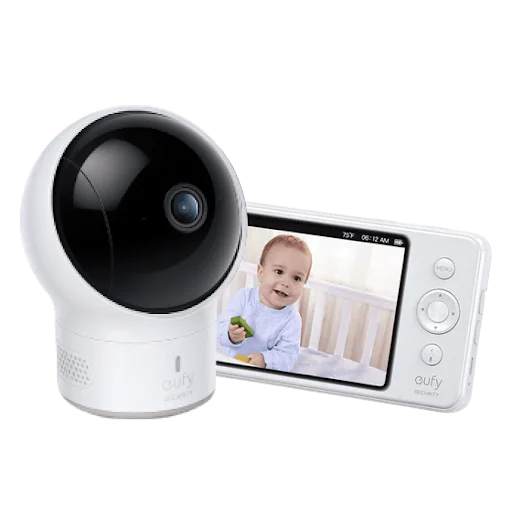
A fixed-angle camera can work well if your baby’s crib is positioned in the centre of the room, but positioning constraints don’t always allow for that ideal setup. Pan-tilt cameras can be adjusted remotely from the parent unit, letting you scan the full room without physically moving the camera. Zoom functionality allows you to get a closer look at your baby’s face or position without entering the room. These features are particularly valuable as babies grow into toddlers and start moving around in their sleep or exploring their crib. Brands like eufy offer monitors with smooth remote pan-tilt controls that make room-scanning feel intuitive rather than mechanical.
What to Consider Based on Your Home and Lifestyle
The best baby monitor for your neighbour may not be the best one for you. A few personal factors should shape your decision significantly.
Home size and layout directly affect which type of monitor will serve you best. In a small apartment where the nursery is just down a short hallway, even a basic audio monitor may provide adequate coverage. In a larger multi-story home, you’ll want a monitor with strong range and possibly a system that supports multiple cameras if you have more than one area to monitor.
Your comfort with technology is another honest consideration. Smart monitors with app connectivity offer tremendous flexibility — you can check on your baby from the living room, backyard, or even while travelling. But they also require setup, occasional troubleshooting, and reliance on your internet connection. If technology frustrates rather than helps you, a dedicated parent unit without Wi-Fi dependency may serve you better day-to-day. There’s no shame in choosing simplicity when simplicity is what works for your household.
Battery life on the parent unit matters more than it might seem. A monitor that needs charging every few hours is inconvenient during night shifts when the last thing you want to do is find a charging cable. Look for parent units with at least eight hours of screen-on battery life, or models that can run continuously while plugged in without overheating.
If you’re planning to use the baby monitor through multiple children or for an extended period, durability and the quality of the build matter. Cheaper plastic units can feel flimsy and may not survive the bumps and drops that come with daily family life. Investing a little more upfront in a well-built monitor can save you the frustration of replacing it after a year.
Common Mistakes When Choosing a Baby Monitor
Parents often make a few predictable mistakes when shopping for a monitor. Being aware of them ahead of time can save you money and frustration.
Prioritising features you won’t actually use is one of the most common missteps. A long list of capabilities looks impressive, but if you’re unlikely to use sleep tracking analytics or lullaby playlists, paying a premium for them doesn’t make practical sense. Focus on the features that address your actual concerns — whether that’s clear nighttime video, long range, or reliable two-way audio — rather than the ones that look good in a product listing.
Ignoring placement logistics is another frequent oversight. A monitor camera placed too close to the crib will give you an extreme close-up that isn’t useful. Placed too far away or at the wrong angle, you may not be able to see your baby’s face at all. Think carefully about your nursery layout and where you can realistically mount or position a camera before choosing a model. Some cameras require a dedicated mount or shelf, while others come with flexible positioning options.
Not testing connectivity before fully relying on the monitor is a mistake that can have stressful consequences. Set up your monitor thoroughly before your baby starts sleeping in the nursery full-time. Test the signal in every part of your home where you’re likely to be while your baby sleeps. Identify any dead zones and address them — whether by repositioning your router, adding a Wi-Fi extender, or choosing a different monitor technology.
Setting Up Your Baby Monitor for Best Results
Getting the most out of your monitor starts with thoughtful setup. Camera placement is critical — position the camera at roughly the same height as the crib mattress or slightly above, angled down toward your baby’s face. This angle gives you the clearest view of breathing and movement without extreme distortion. Keep the camera out of reach as your baby grows to prevent it from being grabbed or knocked over.
Adjust the sensitivity settings if your monitor offers them. A monitor set to maximum sensitivity will trigger alerts at every minor sound, which quickly leads to alert fatigue. Calibrating the sound sensitivity to respond to sustained crying rather than brief rustles will give you more useful notifications without keeping you on edge all night.
For Wi-Fi monitors, secure your home network with a strong password and keep the monitor’s firmware updated. Manufacturers regularly release security patches, and running outdated firmware can expose the device to vulnerabilities. Treating your baby monitor with the same security consciousness you’d apply to any connected device in your home is a sensible habit.
Finally, keep spare batteries charged for the parent unit if it uses rechargeable batteries, and establish a routine of plugging it in before your own bedtime so it’s always ready when you need it.
Finding the Monitor That Fits Your Family
Choosing a baby monitor is ultimately about matching the right tool to your specific circumstances. A high-end smart monitor loaded with features is a fantastic choice for tech-comfortable parents in a large home who want comprehensive visibility. A straightforward video monitor with solid night vision and reliable range is the right call for parents who want dependable simplicity without the complexity of app management. Neither choice is wrong — what matters is that the monitor you choose actually works in your home and gives you the confidence to rest when your baby rests. Start with your genuine needs, check user reviews for real-world performance in homes similar to yours, and don’t be swayed by features that sound impressive but don’t align with how you’ll actually use the device. The right baby monitor is the one that lets you sleep a little easier knowing your baby is safe.
Subscribe to get the latest posts sent to your email.
Clare
Hi, I'm Clare (Emmy's Mummy). A former Nanny and Mother of 2 - Emmy (born February 2010) and Harry (born October 2012). We are Essex based and share our adventures and misadventures of a busy crazy life.